It's Here! Salesforce Winter '27 Release
Less assisting, more doing: the Winter '27 changes that matter for your org

Salesforce's Winter ’27 Release is here: What’s Changed and what do you need to know?
Salesforce’s Winter ’27 release notes went live in mid-August 2026, and as always, there’s a lot to unpack before your sandbox preview window opens. Rather than sending you off to read hundreds of pages of release notes, we’ve pulled together the features and changes that matter most — for admins, developers, sales teams, and marketers alike.
As always: most new features are opt-in and need to be manually enabled, so this is as much a planning exercise as a reading list. Here’s where we’d focus your attention.
The theme of this release? Agents that finish the job, not just start it
The headline shift in Winter ’27 is a move from AI agents that assist with individual tasks to agents that run entire workflows end-to-end — qualifying pipeline, resolving cases, booking appointments — across the channels businesses already use, from Slack and Teams to voice. Everything is still grounded in governed CRM data, which is the point: it’s what makes handing off a whole workflow to an agent viable rather than just answering one-off questions.
The most immediate operational change here is that Agentforce is being auto-enabled by default for any org with Agentforce access — that’s Foundations on Enterprise, Performance, Unlimited and Developer Edition, plus Agentforce 1 Edition orgs. New orgs get it at creation; existing orgs are being switched on gradually starting the first week of September. The Agentforce toggle disappears from Setup entirely. If your org falls into one of these license categories, this is worth flagging to stakeholders now, even though Salesforce says there’s no billing impact.
Key dates for the Winter ’27 release
September 4 — Release Overview Deck published; release badge available; preview site live; Winter ’27 goes live for the first release group
October 2 and October 9 — Winter ’27 goes live for the remaining release groups
October 10 — Release Readiness livestream on Salesforce+
Worth pinning this to your team calendar now, particularly the sandbox cutoff — if you need a sandbox refreshed on the current release rather than Winter ’27, that has to happen before August 27.
Salesforce admins: 'quality-of-life' wins and better security
A few changes worth putting on your admin checklist:
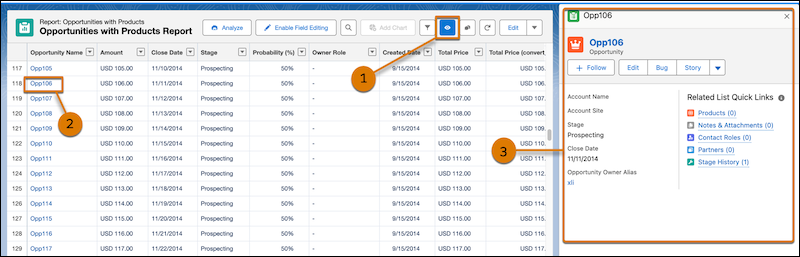
Record preview in Lightning reports (Beta) — click an eye icon next to a report row to preview the record in a sidebar, without leaving the report or opening a new tab. Small feature, real impact if your team lives in reports.
Profile filtering enforcement — first introduced in Summer ‘26, this is now enforced: users can only see their own profile unless they have View All Profiles. No admin action needed unless your users currently need to see others’ profiles.
Setup Audit Trail access tightened — visibility now requires a dedicated View Setup Audit Trail permission rather than being bundled into broader access.
Email Change Verification can no longer be disabled by Support — if you’ve relied on Salesforce Support to temporarily switch this off for bulk email updates (say, after a domain migration), that workaround is gone. Bulk changes now require an Authorized Email Domain configured via DKIM, so get that set up in Setup before planning any mass update.
More Agentforce in Setup itself — including natural-language control over Dynamic Actions on mobile, continuing the shift toward a conversational Setup experience.
Flow Builder improvements
Flow Builder also gets a substantial refresh this release — worth a mention on its own, since it’s arguably where admins will feel Winter ’27 the most day to day:
Test Mode (Beta) — a new, more powerful replacement for the old Debug tool, letting you build and re-run repeatable tests directly in Flow Builder.
Bulk actions from list views and related lists — screen flows can now process multiple selected records at once via a Flow Quick Action, instead of needing a one-record-at-a-time workaround.
Save-time validation — Flow Builder now warns you if a Create Records element is missing a required field, or if a value is likely to exceed a field’s length limit, before you find out the hard way at runtime.
Group elements — sections of a flow can now be labelled, collapsed, and expanded on the canvas, similar to a lightweight subflow, which should help a lot with legibility on larger flows.
Edit History — a proper version timeline for flows, with the ability to drill into what changed between saves and restore earlier versions.
For developers: fewer walls to work around
Winter ’27 isn’t built around one flashy feature for developers — it’s a set of practical fixes that add up:
- Increased Apex heap limits, which should mean fewer failed transactions on data-heavy processes.
- FORMULA() in SOQL, letting you evaluate formula logic directly in a query instead of creating a dedicated formula field just to expose a calculation.
- Continued rollout of Flow Test Mode and Flow Tags, giving teams a more structured way to test and govern flows without slowing down deployment.
- A modernized Flow Builder canvas aligned to SLDS 2 (the Cosmos theme), with better contrast, updated iconography, keyboard shortcuts, and node grouping.
- Web Console replaces Developer Console — a new browser-based IDE built on VS Code for Web, letting you write and test Apex and run SOQL natively in the org without local setup.
- Developer Console (in most orgs) is not visible by default: to re-enable you can do so within Setup via Quick Find > Web Console, then switch Enable Developer Console to Active. If Web Console is set to Inactive, Developer Console reactivates automatically, so you’re not locked out either way during the transition. You can also enable both...
- Retirement to plan for: It is worth double-checking your release calendar: the OAuth 2.0 username-password flow retirement, originally expected this cycle, has been pushed to February 20, 2027. If you’ve been holding off auditing connected apps that still use grant_type=password, you’ve got a bit more runway — but not much, so it’s still worth doing that audit now rather than later.
For sales teams: AI woven further into daily workflow
Sales Cloud picks up a batch of Agentforce-driven capabilities this release, including AI-suggested follow-up actions after meetings, post-meeting voice notes, and improved pipeline insight.
One notable addition for admins and managers: the Agent Activity tab now shows what a prospecting agent actually did during a session — how many records it reviewed and why each was qualified or ruled out — rather than just the shortlist it surfaced.
That’s a meaningful trust and transparency improvement if you’ve had reps asking “why didn’t it flag that account?”
For marketers: the CMS story continues to take shape
Marketing Cloud Next continues to mature this release, with enhancements to campaigns, flows, and audience management.
The bigger story to watch is content management: following Salesforce’s acquisition of Contentful in mid-2026, CMS capability features far more prominently in Winter ’27 than in previous cycles.
If your org has been waiting on stronger native content tooling, this release is the first real signal of where that’s heading — worth watching rather than acting on immediately, since deeper integration is likely to build out over the next few cycles.
What we’d recommend doing now
With the release now out for most orgs - we have a little checklist for things you should do:
1. Check your license type against the Agentforce auto-enablement criteria, and loop in stakeholders if it applies to you.
2. Audit connected apps for any still using the OAuth username-password flow, even with the extended deadline.
3. Set up an Authorized Email Domain if you rely on bulk user email updates.
4. Review Setup Audit Trail permissions to make sure the right people retain access after the change.
5. Test new features in a sandbox first, as always — particularly anything Agentforce-related, since much of this release is still in preview until Salesforce confirms general availability.
Wrapping up...
Winter ’27 is less about one headline feature and more about the platform continuing to shift toward agents that do real work end-to-end, with a steady stream of admin and developer quality-of-life improvements alongside it.
As always, we’re happy to help you work out which of these are worth prioritizing for your org — get in touch if you’d like a hand planning your release readiness.
More information
• Official Salesforce Winter ’27 Release Notes
• Admin Winter ’27 Release Countdown
• 17 New Salesforce Flow Features in Winter ’27
Recent Posts